How to Check AI Bot Access and Improve Website Crawling Performance

Knowing whether AI bots can access your website is now a real concern for businesses, marketers, and site owners. Today, visibility does not depend only on search engines. AI platforms also read and use website content to generate answers, summaries, and recommendations. If these bots cannot reach your site, your content simply won’t appear in those results.
At the same time, giving full access without any control can create problems. Your content may get used in ways you did not intend, or your server resources may get overused. That’s why it becomes important to not only check access but also manage it properly.
This article focuses on the practical side. You will learn how AI bots work, how to check if they can access your site, how to track their activity, and how to make better decisions based on real data. Each section follows a clear approach so you can apply everything directly to your website.
What Are AI Crawlers?
AI crawlers are automated programs designed to scan and process website content, but their purpose goes beyond indexing pages for rankings. Unlike traditional bots, they are built to:
- Read and understand content context
- Extract meaningful information
- Use that information to generate answers, summaries, or recommendations
These crawlers are used by AI-driven platforms such as:
- OpenAI (ChatGPT, GPT models)
- Google (Gemini, AI Overviews)
- Microsoft (Copilot, Bing AI)
AI crawlers focus on understanding and using content, making them a key part of how information is processed and delivered through modern AI platforms.
You may also read: Optimizing Website Content for AI Using GEO
Why AI Crawlers Matter for Your Website
Knowing how AI systems use website content helps you understand why these changes directly impact your visibility and performance.
- Content usage without clicks
Your content may be used in AI-generated answers without users visiting your site. - Shift in visibility
Your website may still be referenced even if traffic does not increase. - Higher content standards
Clear, structured, and informative content is more likely to be used. - Change in SEO focus
Understanding and context now matter more than just keywords.
Overall, adapting to these changes ensures your content remains relevant, usable, and valuable in an AI-driven environment.
How AI crawling impacts SEO and traffic
When AI bots access your website, they don’t just index pages - they interpret and reuse your content in formats like summaries, direct answers, and recommendations. This changes how your content contributes to visibility and user decisions.
- Your content may appear in AI-generated answers
Information from your pages can be used to respond directly to user queries. - Your brand gains recognition
Even without a click, your name or insights may be associated with the answer. - Your influence extends beyond traffic
Users may make decisions based on AI responses that include your content.
At the same time, this works differently from traditional SEO. Traffic may not always be reflected in analytics, but your content still contributes to awareness, trust, and conversions.
| Area | Impact |
|---|---|
| Visibility | Shows up in AI answers |
| Branding | Builds trust and authority |
| Traffic | Indirect, but valuable over time |
If AI bots cannot access your site, you miss all of these benefits.
Difference Between Search Engine Bots and AI Bots
Search engine bots and AI bots serve different purposes, even though both crawl websites. Search bots focus on ranking pages and driving traffic, while AI bots focus on understanding content and using it in responses.
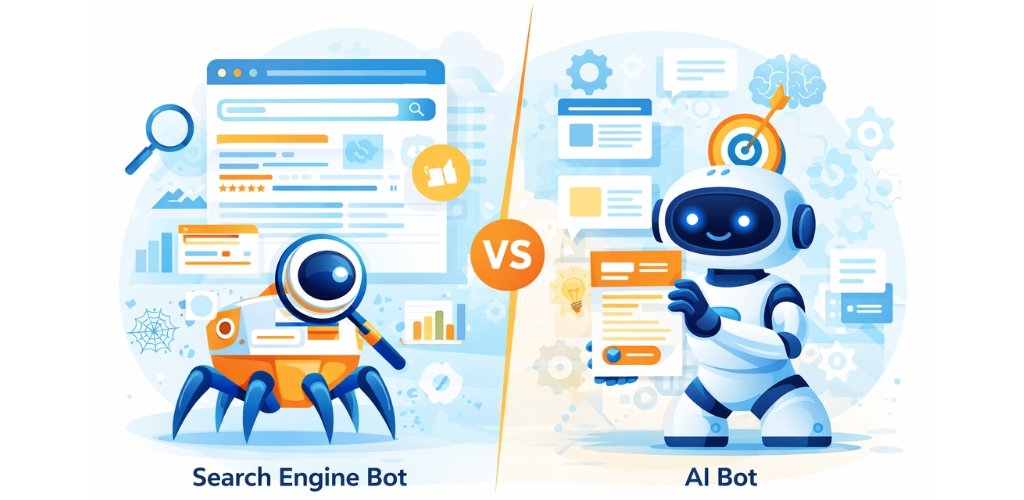
Understanding these differences will help you manage access and expectations more effectively.
| Feature | Search Engine Bots | AI Bots |
|---|---|---|
| Primary Purpose | Rank and index web pages | Understand and use content for AI responses |
| Output | Search engine result pages (SERPs) | AI-generated answers, summaries, and insights |
| Crawling Style | Systematic, full-site crawling | Selective and content-focused crawling |
| Content Focus | Metadata, keywords, backlinks | Meaning, context, and readability |
| JavaScript Handling | Can process JavaScript (advanced bots) | Often prefers simple HTML content |
| Frequency of Crawling | Regular and scheduled | Irregular, based on need or updates |
| Indexing | Stores pages in search index | Stores data for training or response generation |
| Visibility in Analytics | Clearly visible in tools like Google Analytics | Often hidden or not tracked |
| User-Agent Transparency | Clearly defined and documented | Sometimes unclear or evolving |
| Compliance with robots.txt | Generally follows rules strictly | May partially follow or ignore rules |
| Impact on Traffic | Direct (drives clicks to website) | Indirect (influences decisions without clicks) |
| Data Usage | Ranking and search display | Training models and generating answers |
| Crawl Depth | Deep crawling across pages | Focuses on high-value or relevant content |
| Resource Usage | Optimized crawling patterns | Can vary depending on bot behavior |
When you understand these differences in detail, it becomes much easier to check access, track activity, and manage AI crawlers effectively.
How do AI Bots Crawl Websites?
Before you check whether AI bots can access your website, it helps to understand how they actually move through it. When you know their process, you can quickly identify where things may go wrong. AI bots follow a simple but structured path when they crawl a website:
- AI bots usually find your website through links, datasets, or external references
- Before accessing anything, they review your robots.txt file to understand the rules
- Only the pages that are allowed get accessed during the crawl
- Once inside, the bot reads and extracts the main content from each page
- The collected data then gets stored or processed for future use
Unlike traditional search engine bots, AI bots do not try to crawl everything. They stay focused on useful and readable content. They usually avoid:
- Heavy design elements
- Complex scripts and dynamic content
- Interactive features that require user actions
Their goal remains simple: read clean content and understand it quickly.
Role of robots.txt in AI crawling
The robots.txt file works as the first checkpoint for most bots. It tells them what they can access and what they should avoid. Here’s a basic example:
User-agent: GPTBot
Disallow: /
This rule blocks GPTBot from accessing your website. Keep these points in mind:
- Bots check robots.txt before they start crawling
- A small mistake in this file can allow or block access unintentionally
- It provides instructions, but it does not enforce them
So while robots.txt gives you control, it does not guarantee that every bot will follow your rules.
Do all AI bots follow crawling rules?
Not all AI bots behave the same way. Their approach to rules can vary. Some bots:
- Follow robots.txt strictly
- Follow it partially
- Ignore it in certain cases
This creates a level of uncertainty for website owners.
Because of this, you should not rely only on robots.txt. You also need to verify actual activity through logs and monitoring tools.
When you understand how AI bots crawl and how they respond to rules, it becomes much easier to identify issues, fix access problems, and manage their behavior on your website.
You may also explore: What Is Answer Engine Optimization & Why It Matters for AI Search?
5 Steps to Check If AI Bots Can Crawl Your Website
Now let’s get into the part that actually matters - checking whether AI bots can access your website. Instead of guessing, you can follow a clear process and understand what is really happening behind the scenes.
Step 1: Check your robots.txt file
The first place to start is your robots.txt file. This is where bots look before they crawl your website, so it directly affects access. Open:
yourdomain.com/robots.txt
Once you’re there, go through it carefully. Look for any rules related to AI bots and check if something is blocking them. Also, pay close attention to formatting. A small error here can completely change how bots behave. Focus on:
- Whether AI bots are allowed or disallowed
- Any broad rules like Disallow: /
- Typos or incorrect syntax
This step sets the foundation, so take your time with it.
Step 2: Use AI crawler checker tools
After reviewing your robots.txt file, it helps to get a quick external check. AI crawler tools give you a simple overview of your setup without requiring technical effort. They can quickly show:
- Which bots can access your website
- Which ones are blocked
- Any visible configuration issues
This step is fast and useful, but it should not be your final conclusion. Think of it as a quick validation before moving deeper.
Step 3: Analyze server log files (most accurate method)
If you want a clear answer, server logs will give it to you. They show actual activity, not assumptions.
Go into your hosting logs and search for AI bot names. When you find entries like:
User-Agent: GPTBot
Status: 200
It means the bot successfully accessed your website. While reviewing logs, pay attention to what really matters:
- Are bots visiting your site regularly?
- Which pages are they accessing?
- Are you seeing successful responses (200) or blocked ones (403)?
This step removes all guesswork. It tells you what is truly happening.
Step 4: Check firewall and hosting restrictions
Sometimes everything looks correct in your robots.txt file, but bots still cannot access your website. In most cases, the issue is at the server or security level. Security systems often block traffic automatically. This includes:
- Cloudflare or CDN-level protection
- Website security plugins
- Hosting-level restrictions
These tools may treat AI bots as unknown traffic and block them. That’s why you need to review these settings and make sure they are not interfering with access.
Step 5: Monitor crawl activity over time
A single check is not enough. AI bot activity changes, and your website setup may also change over time. Instead of checking once and forgetting, keep an eye on:
- Visit frequency (are bots coming back?)
- Page access patterns
- Changes in response codes
Over time, this gives you a clear picture of how bots interact with your site. It also helps you catch issues early and adjust your setup when needed.
When you follow these steps properly, you stop relying on assumptions. You start working with real data. This gives you complete clarity and control over how AI bots access and interact with your website.
How to Identify AI Bot Visits in Your Server Logs
Server logs give you direct proof of whether AI bots are visiting your website. You just need to know what to look for.
Common AI bot user-agents to look for
Start by searching for known AI bot names in your logs:
- GPTBot
- ClaudeBot
- PerplexityBot
- Google-Extended
If these appear, it means bots have attempted to access your site.
How to filter logs quickly
Instead of going through everything, narrow it down:
- Search by bot names
- Filter logs by date
- Check status codes (200, 403, etc.)
This helps you find relevant data faster.
Signs that AI bots are actively crawling
Look for patterns, not just one entry:
| Indicator | Meaning |
|---|---|
| Frequent visits | Active crawling |
| 200 status | Successful access |
| Multiple pages | Deeper crawling |
When you see consistent activity in logs, you can confirm that AI bots are actively crawling your website.
Common Issues That Block AI Crawlers (And How to Fix Them)
Many websites block AI bots without even realizing it. Everything may look fine on the surface, but a small configuration issue can stop bots from accessing your content.
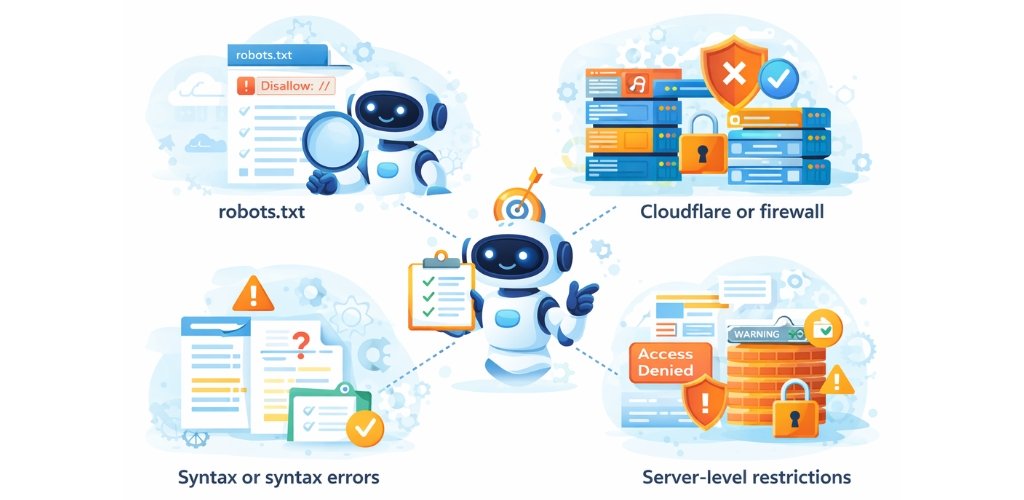
That’s why it’s important to know where problems usually occur and how to fix them.
1. robots.txt misconfigurations
The robots.txt file often causes the most common issues. A single line can either allow full access or block everything. Some typical mistakes include:
- Blocking all bots using Disallow: /
- Missing rules for specific AI bots
- Incorrect formatting or typos
The best way to fix this is to review the file carefully. Make sure the rules are clear, correctly written, and only restrict what you actually want to block.
2. Cloudflare or firewall blocking
In many cases, the issue is not in your website files but in your security setup. Tools like Cloudflare or other firewalls can block bots automatically, especially if they treat them as unknown traffic. To fix this, check your security settings and:
- Allow trusted AI bots
- Adjust bot protection or security levels
This ensures that valid bots are not blocked unnecessarily.
3. Incorrect directives or syntax errors
Even small syntax errors can create unexpected problems. A missing symbol, wrong format, or misplaced rule can stop bots from reading your instructions correctly. To avoid this:
- Validate your robots.txt file using online tools
- Follow proper formatting for each directive
Taking a few minutes to clean up errors can prevent bigger issues later.
4. Server-level restrictions
Sometimes the restriction comes from the server itself. Hosting providers or server configurations may block certain user-agents by default. In this case, you should:
- Review your hosting or server settings
- Allow the required AI bot user-agents
This step ensures that bots are not blocked before they even reach your website.
Most blocking issues come from small mistakes, not major problems. Once you identify and fix them, AI bots can access your website smoothly and interact with your content as expected.
You may also know: How Do AI SEO Tools Scale Agile Solutions?
Should You Allow or Block AI Bots?
Now comes the important decision - how much access should you actually allow? Allowing AI bots can improve your visibility in AI-generated answers, strengthen your brand presence, and support long-term exposure. Even if it does not always bring direct traffic, your content still influences how users see and trust your brand.
At the same time, unrestricted access comes with risks like content misuse, no guaranteed returns, and increased server load. A balanced approach works best. Allow only trusted bots, monitor their activity regularly, and restrict access to sensitive pages. This way, you stay in control while still benefiting from AI-driven visibility.
Tools to Check and Monitor AI Crawlers
Using the right tools makes it much easier to understand how AI bots interact with your website. Instead of checking everything manually, these tools help you get quick insights, identify issues, and monitor activity more efficiently.
Useful Tools for Checking and Monitoring AI Crawlers
| Tool Type | What It Does | Best Use Case |
|---|---|---|
| AI Crawler Checker Tools | Scans your website and shows which AI bots can access it | Quick access check and basic validation |
| Server Log Viewers | Displays raw server logs to track real bot activity | Verifying actual visits and behavior |
| Log Analysis Tools | Processes large log files and highlights patterns | Understanding crawl frequency and trends |
| Online robots.txt Validators | Checks your robots.txt file for errors | Fixing syntax and configuration issues |
| Security Dashboards (e.g., CDN tools) | Monitors and controls bot traffic at server level | Managing access and preventing unwanted blocks |
In general, tools help you get a quick overview, but logs give you the most accurate picture. For best results, use tools for fast checks and rely on server logs when you need confirmation.
FAQs About AI Crawlers and Website Access
Yes, some bots may ignore it. It works as a guideline, not a strict rule.
It can take a few hours to a few days, depending on access and discovery.
They do not directly affect rankings, but they influence visibility in AI answers.
You can add specific rules for each bot in robots.txt.
No, most AI bots do not show up in standard analytics.
They can only access pages that are publicly available.
Most prefer simple HTML and may skip heavy scripts.
Check logs weekly or monthly based on your website size.
Final Thought
Checking AI bot access is not a one-time task. You need a clear process to understand what is happening and to stay in control.
When you follow the steps in this guide, you can confirm access, fix issues, and manage how bots interact with your website. This helps you protect your content while also improving your visibility across AI platforms.
AI-driven systems continue to grow. Keeping your website ready for them gives you an advantage that many businesses still ignore.
Share This Post
RELATED RESOURCES
Checkout Our Latest Articles & News Updates

 Anish P.
 Sam M.

We, as a digital marketing agency, offer a complete package of web design, development, and online marketing services to help you achieve your business goals. At VerifiedCliq Solutions, we offer exceptional SEO services that utilize cutting-edge strategies to optimize your website both on and off the site, ensuring remarkable results.
©2021-2026 VerifiedCliq Solutions. All Rights Reserved. Sitemap | Privacy Policy | Terms of Service